import { Stepper } from 'zudoku/ui/Stepper';
# Zapier Integration
Contact us at [support@lelapa.ai](mailto:support@lelapa.ai) to get private access to the Zap today!
## **Why Connect Lelapa AI with Zapier?**
The Lelapa AI x Zapier zap empowers anyone to automate tasks like transcription, translation, and sentiment analysis \- without writing any code\! By integrating Lelapa AI with Zapier, you can:
* **Transcribe audio automatically** from a data source.
* **Translate content seamlessly** into multiple languages.
* **analyse sentiment & extract insights** from customer feedback, support tickets, and online content.
* **Boost efficiency & reduce manual work** without writing any code..
🚀 Start automating today\!
---
## **How to Connect Your Zapier Account with Lelapa AI**
1. **Get Your Lelapa AI API Key**
- Sign in to [**Vulavula Platform**](https://vulavula.lelapa.ai/) or create an account.
- Navigate to **Keys** in the sidebar.
- Click **Generate API Key** or copy an existing one.
1. **Log in to Zapier**
- Go to [**Zapier.com**](https://zapier.com/) and sign in or create an account.
- Click **Create Zap** in your dashboard.
1. **Choose Your Trigger App**
- Select an app (e.g., **Google Drive, Amazon S3**) as the **Trigger**.
- Authenticate your account to allow Zapier access.
1. **Set Up Lelapa AI Actions**
- Choose **Lelapa AI** as the **Action App**.
- Authenticate with your **API Key** from Step 1\.
- Select an action:
- **Transcribe** (Convert audio to text)
- **Translate** (Translate transcriptions)
- **Sentiment Analysis** (Determine the tone of a text)
- **Entity Recognition** (Identify key entities in a text)
- Map inputs from your **trigger app** to Lelapa AI.
1. **Test & Activate Your Zap**
- Run a test to ensure your workflow works.
- Click **Turn On Zap** to automate your process.
---
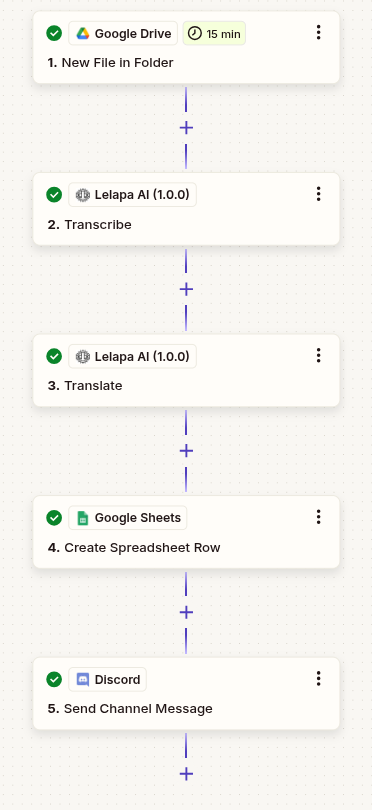
## **Example: Automating Audio Transcription and Translation**
### Scenario: A business uploads audio feedback in multiple languages to Google Drive. Lelapa AI transcribes and translates them instantly, saving hours of manual work.
🔹 **Trigger:** Upload an audio file to Google Drive.
🔹 **Action 1:** Lelapa AI transcribes it to text.
🔹 **Action 2:** The transcription is translated into English.
🔹 **Action 3:** The result is stored in Google Sheets.
🔹 **Action 4:** A Slack/Discord notification is sent to the team.
🚀 **Outcome:** No manual work, faster reporting, and easy access to multilingual content.
---
## **Additional Use Cases for Lelapa AI with Zapier**
Beyond transcription and translation, Lelapa AI can be integrated with Zapier to automate various tasks:
✔ **Customer Support Automation:** Prioritize urgent tickets in Zendesk using sentiment analysis.
✔ **Feedback Insights in Seconds:** Automatically analyse Google Forms reviews & categorize responses.
✔ **Multilingual AI-Powered Support:** Convert African languages to English for support teams.
---
## **Demo Video & Next Steps**
🎥 **Coming Soon\!** A step-by-step demo video showcasing Lelapa AI’s Zapier integration will be available soon.
## **FAQ**
### **1\. Do I need coding skills to use Lelapa AI with Zapier?**
No, Lelapa AI integrates seamlessly with Zapier’s no-code automation, allowing you to create workflows without writing a single line of code.
### **2\. What types of files can Lelapa AI transcribe?**
Lelapa AI can transcribe audio files from formats such as *wav, mp3, flac, aac, ogg, mp4, aiff, opus*. It can process files uploaded from cloud storage services like Google Drive and Amazon S3.
### **3\. What languages does Lelapa AI support?**
Lelapa AI supports multiple African languages. Check the official [documentation](https://docs.lelapa.ai/getting-started/language-support) for the full list.
### **4\. What are the pricing options for Lelapa AI?**
Lelapa AI offers various pricing plans. Visit the [pricing page](https://docs.lelapa.ai/getting-started/plans) for more details.